



ADاشتہار / AdvertisementGoogle Ad
Windows 11 adds phone controls to Quick SettingsTechnology
0 ویوز
Microsoft's latest Windows 11 Insider build puts Android phone controls and a built-in speed test into Quick Settings, keeping everyday phone and network checks one click away.
شیئر کریں:
Microsoft is testing a new way to manage a connected phone from Windows 11, bringing phone controls and an internet speed test directly into Quick Settings. The features are part of Windows 11 Insider Preview Experimental build 26340.9767, released on 23 October 2026, and are rolling out gradually to testers.
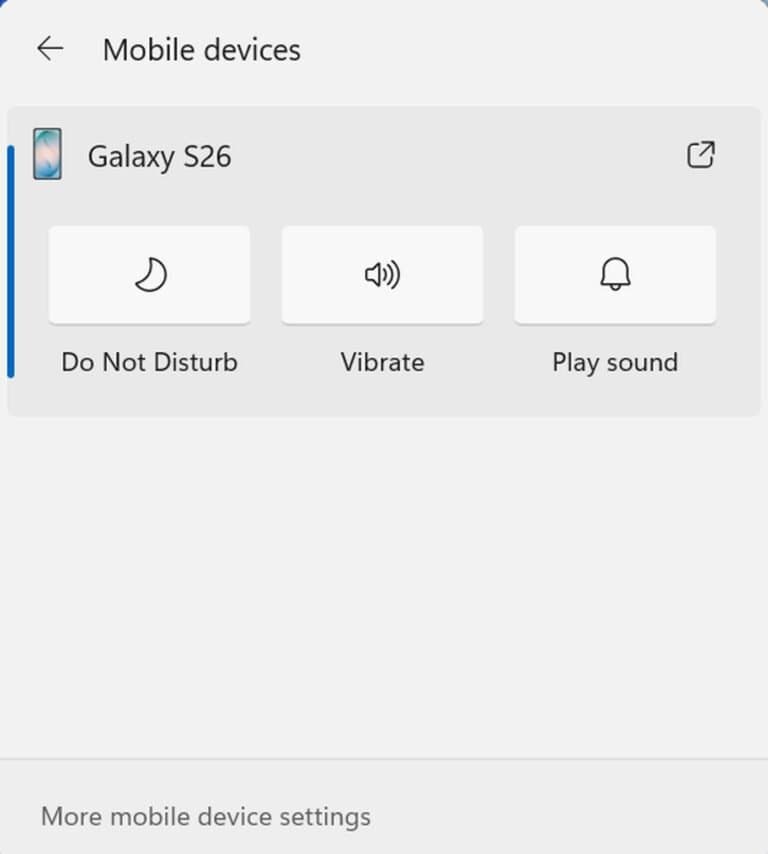
The headline change is a new Mobile devices experience in Quick Settings. With a supported Android phone connected, users can turn on Do Not Disturb before a meeting, change the phone’s ringer mode, and play a sound to find the phone nearby, all without opening a separate app. Opening Quick Settings from the taskbar and selecting Mobile devices shows the phone’s battery status and the controls available for that device. If no phone is connected yet, Windows walks the user through setup.
ADاشتہار / AdvertisementGoogle Ad
Microsoft says the initial experience gives Android phones the most complete set of controls, while iPhone support starts with a more limited, status-focused experience. Capabilities can also vary by phone model and device configuration, so not every connected handset will show the same options.
The idea is a small but practical one: the panel people already use for quick Windows actions becomes the place to silence a phone before a meeting or track it down when it slips down the side of the sofa. It builds on years of Microsoft’s Phone Link work, but moves the most common actions one click closer.
Alongside the phone controls, the same build adds a built-in internet speed test to Quick Settings. Users can start a test from the new Speed test Quick Setting, from the Wi-Fi or Cellular flyout, or by right-clicking the network icon in the system tray and choosing Test internet speed. While the test runs, Quick Settings shows its progress, and the results, including download speed, upload speed and ping, appear directly in the panel.
That matters because an earlier Windows Insider speed test sent users to a browser to see their results. The new version keeps everything inside Windows, giving a quick read on how the current connection is performing without breaking the user’s workflow. Microsoft notes that the test runs against the active internet connection, so it reflects the network in use at that moment.
The build also adds the ability to filter Feature flags by enablement state on the Windows Insider Program settings page, a change aimed at testers rather than everyday users. Other additions in the release include an option to manage Microsoft 365 recurring billing from Settings, improved File Explorer loading indicators for slower locations such as network drives, and additional language support for mathematical content in Narrator.
As with all Experimental channel features, there is an important caveat: these additions are in testing and may change or never reach the general release. The rollout is gradual, so Insiders on build 26340.9767 who do not yet see the Mobile devices section may simply not be in the rollout group yet. Microsoft has not said which phone models are supported or when the features might reach all Windows 11 users, but for testers, the phone is now one click closer to the desktop.
متعلقہ خبریں


سب سے زیادہ پڑھی جانے والی
روزنامہ حیات فیس بک پیج
روزانہ کی تازہ خبریں اور اہم اپ ڈیٹس حاصل کرنے کے لیے ہمارے فیس بک پیج کو فالو کریں۔
فیس بک پر فالو کریں